How to Start YouTube Automation with Google Gemini (2026 Beginner’s Guide)

Ever thought about running a YouTube channel without showing your face, recording yourself or spending hours figuring out what to post?
That’s where YouTube automation comes in.
With AI tools like Google Gemini, you can simplify different parts of running a YouTube channel, from finding video ideas and writing scripts to creating visuals and planning your content.
The interesting part? You don’t need to be a professional video editor or an experienced content creator to get started.
Whether you’re a student, freelancer, side hustler or someone looking to explore content creation, this guide will show you how to start YouTube automation with Google Gemini, even as a complete beginner.
What Is YouTube Automation?
YouTube automation is a content creation approach where you use tools, templates and repeatable workflows to manage different parts of a YouTube channel.
Some creators use this model to run faceless YouTube channels, meaning they don’t appear on camera. Instead, their videos might feature voiceovers, animations, stock footage, AI-generated visuals, tutorials or storytelling.
For example, you could create a channel about personal finance, technology, interesting historical events or educational content without recording your face.
With Gemini, you can automate or simplify several tasks, including:
- Researching popular topics and generating video ideas.
- Writing video outlines and scripts.
- Creating storyboards and visual prompts.
- Generating and refining video concepts.
- Writing video titles and descriptions.
However, automation doesn’t mean doing absolutely nothing. You still need to review your content, add creative input and understand what your audience actually wants to watch.
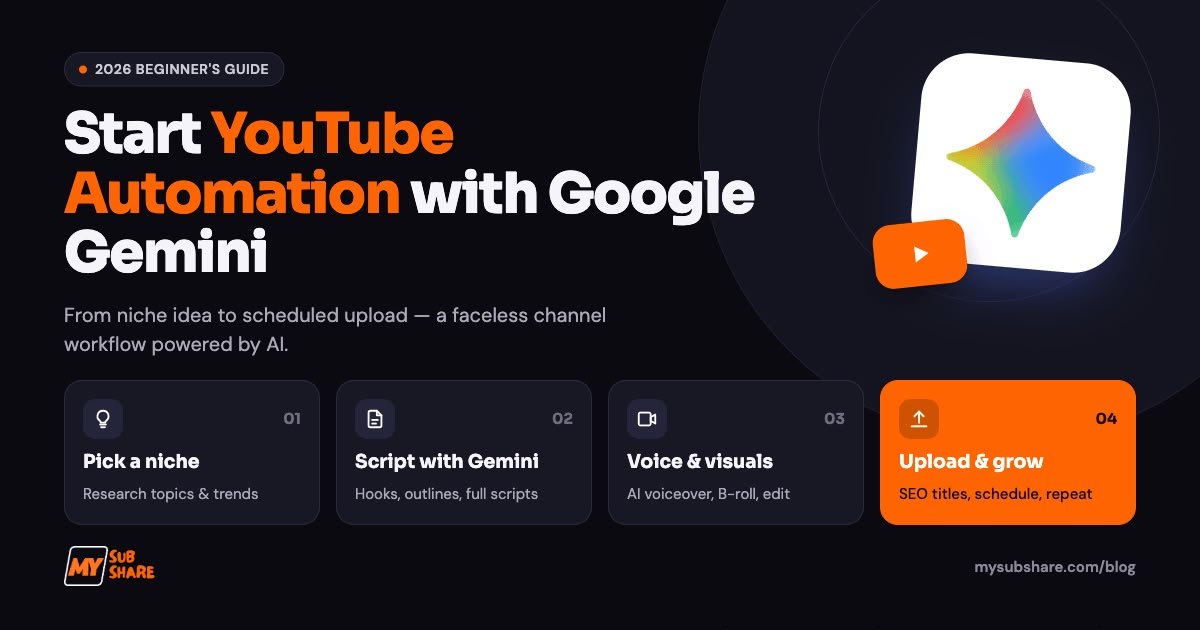
How to Start YouTube Automation with Google Gemini
Here is a practical workflow you can follow to start your channel.
Step 1: Choose a Profitable YouTube Niche
Before opening Gemini, decide what your channel will be about.
A niche helps you attract a specific audience instead of publishing random videos about unrelated topics.
Some niches worth exploring include:
- Personal finance and money tips.
- Technology and AI tutorials.
- Educational content.
- History and interesting facts.
- Business and entrepreneurship.
- Health and lifestyle education.
Don’t choose a niche simply because someone claims it generates millions of views. Consider your interests, what you can research accurately and whether people are actively looking for that type of content.
Try this Gemini prompt:
“Act as a YouTube content strategist. Give me 10 faceless YouTube channel niche ideas for beginners. For each niche, suggest its target audience, potential video topics, content formats and ways to make the channel different from competitors.”
Use the suggestions as starting points, then check existing channels, search results and audience discussions to validate your ideas.
Step 2: Use Gemini to Research Video Ideas
Once you’ve selected your niche, you need consistent video ideas.
Coming up with fresh topics can become exhausting, especially when you’re trying to publish regularly.
Gemini can help you brainstorm content ideas based on your audience’s interests.
For example, a personal finance channel could cover budgeting, saving money, side hustles and common financial mistakes.
Try this prompt:
“Generate 30 YouTube video ideas for a faceless personal finance channel targeting young adults. Focus on practical problems, educational topics and questions people commonly ask. Give each idea an engaging title and a short explanation of what the video should cover.”
You can also ask Gemini to organise the ideas into content categories and create a 30-day publishing calendar.
One important tip: Don’t treat every AI-generated suggestion as a trending topic. Check YouTube search suggestions, competing channels and Google Trends before investing time in a video.
Step 3: Write Your YouTube Scripts with Gemini
This is where Gemini becomes particularly useful.
A good video needs more than an interesting title. It needs a strong opening, useful information and a reason for viewers to keep watching.
Instead of writing everything from scratch, use Gemini to create your first draft.
Try this prompt:
“Write a 1,200-word YouTube video script about 7 common money mistakes young adults should avoid. Start with a compelling hook, use conversational language, organise the information into seven sections and include practical examples. Make the script engaging and suitable for a faceless YouTube video.”
After generating the script, review it carefully.
Remove unnecessary repetition, verify factual claims and add your own examples or commentary. You want the final video to sound like something your channel created, not a generic AI-generated article being read aloud.
Step 4: Generate Video Visuals Using Gemini
A script alone isn’t a YouTube video. You need visuals that help communicate the story.
Gemini’s video generation capabilities can help turn creative ideas into short video sequences.
Depending on your account, plan and regional availability, you can use Gemini’s video creation tools to generate clips from text prompts or reference images. Its current video tools also support conversational editing and changes to generated scenes.
For example, imagine you’re creating a video about the history of artificial intelligence.
You could ask Gemini to generate a visual showing an early computer laboratory, followed by a futuristic AI research environment.
Example prompt:
“Create a cinematic video scene showing the evolution of artificial intelligence, starting with an early computer laboratory and transitioning into a futuristic AI research environment. Use realistic lighting, smooth camera movement and a documentary-style visual aesthetic.”
You can then build a collection of relevant visual clips to support your script.
For a complete video, you may also need a video editor to arrange scenes, add captions, adjust timing and combine your visuals.
Step 5: Edit Your Video and Add a Voiceover
Once your visuals are ready, it’s time to assemble the video.
You can use tools such as CapCut to combine your clips, add background music, insert subtitles and improve the overall presentation.
For narration, you can record your own voice or use an appropriate text-to-speech tool.
Pay attention to:
- Audio clarity and voiceover quality.
- Smooth transitions between scenes.
- Readable captions.
- Background music that doesn’t overpower narration.
- Removing unnecessary pauses and repetitive footage.
Remember, viewers should be able to understand and enjoy your video without feeling like they’re watching a random collection of AI-generated clips.
Step 6: Create Attractive Thumbnails and Optimise Your Videos
Your thumbnail and title play an important role in attracting viewers.
Gemini can help you brainstorm clickable titles, write descriptions and suggest thumbnail concepts.
For example, ask:
“Give me five engaging YouTube titles for a video about common money mistakes. Make them curiosity-driven without using misleading clickbait. Also suggest three thumbnail concepts with short text overlays.”
You can use Canva to design the final thumbnail.
Before publishing, optimise your video with a clear title, a useful description and relevant keywords. Add appropriate chapters where useful and organise related videos into playlists.
Don’t forget that good SEO cannot compensate for a video that fails to deliver what its title promises.
Step 7: Analyse Performance and Improve
Publishing videos is only one part of growing a channel.
You also need to understand how people respond to your content.
YouTube Studio provides useful analytics, including impressions, click-through rate, watch time, audience retention and subscriber activity.
Use this information to identify:
- Which topics attract the most interest.
- Which thumbnails encourage clicks.
- Where viewers stop watching.
- Which videos generate subscribers.
- What content deserves a follow-up video.
You can then use Gemini to help interpret your findings and suggest improvements.
For example:
“Here are my YouTube video analytics. Identify possible reasons for low audience retention and suggest practical ways to improve my next three videos.”
Provide the actual analytics when using this prompt rather than expecting Gemini to access private channel performance automatically.
Can You Monetise AI-Generated YouTube Videos?
Yes, AI-assisted videos can be monetised, but using Gemini doesn’t automatically make your channel eligible for the YouTube Partner Program.
YouTube expects monetised content to offer original value. Mass-produced, repetitive videos and generic AI content with little meaningful creative input can be considered inauthentic content and may not qualify for monetisation.
You should also understand YouTube’s AI disclosure requirements. Realistic AI-generated scenes or meaningfully altered footage that could mislead viewers may require disclosure during upload.
Using AI to brainstorm ideas, write scripts or create thumbnails generally doesn’t require this disclosure by itself.
The goal is simple: use AI to improve your creative process, not to publish hundreds of interchangeable videos.
You can read YouTube’s official monetisation policies and AI disclosure guidelines before publishing.
What Tools Do You Need to Start YouTube Automation?
You don’t need an expensive collection of software to get started.
Here are some useful tools:
| Tool | What you’ll use it for |
|---|---|
| Google Gemini | Research, ideas, scripts and video creation |
| ChatGPT | Brainstorming and additional writing assistance |
| Canva Pro | Thumbnails and graphic design |
| CapCut Pro | Video editing and captions |
| YouTube Studio | Publishing and channel analytics |
The important thing is choosing tools that solve actual problems in your workflow.
For Nigerian creators, paying separately for multiple premium subscriptions can become expensive.
MySubShare offers subscription cost-sharing options for tools such as Google AI Pro, Canva Pro and CapCut Pro. You can explore available plans and creator bundles, pay your contribution in naira and access the tools included in your selected plan.
Check out MySubShare’s available subscriptions to explore your options. Feature availability and usage limits can depend on the subscription and account arrangement, so check the plan details before subscribing.
Frequently Asked Questions
1. Can I start YouTube automation with Google Gemini for free?
You can begin using Gemini’s available free features for brainstorming, research and scriptwriting. However, some advanced features, including video generation, may require an eligible Google AI subscription.
2. Can Gemini create complete YouTube videos?
Gemini can generate video clips and assist with creative production, but you may still need additional editing tools to combine footage, arrange narration, add captions and produce a polished final video.
3. Can I run a faceless YouTube channel using AI?
Yes. You can use AI tools to support research, scripts, narration and visuals without appearing on camera. However, your videos should still provide original and useful content.
4. How long does it take to make money from YouTube automation?
There is no guaranteed timeline. Results depend on your content quality, niche, consistency, audience engagement and eligibility for monetisation.
5. Is YouTube automation still worth starting in 2026?
It can be worth exploring if you enjoy creating content and are willing to develop a consistent publishing strategy. The key is building a channel with genuine value rather than relying on mass-produced videos.
Final Thoughts
Starting YouTube automation doesn’t have to be complicated.
With Google Gemini, you can simplify research, generate video ideas, write scripts and explore AI-powered video creation. Combine it with tools like Canva and CapCut, and you have a practical workflow for building a faceless YouTube channel.
However, remember that AI is a tool, not a replacement for creativity.
Focus on producing original videos, understanding your audience and improving with every upload.
And when you’re ready to explore premium AI and content creation tools without paying for every subscription individually, check out MySubShare.
Create smarter, spend less and put your ideas to work!
Get the subscriptions in this article for less
You might also be interested in


Guides, launches and deals, straight to your inbox when we publish. No spam, unsubscribe any time.